What Is PTO Tracking Software, and How Do You Choose One?
PTO software (often called a PTO tracker) handles paid time off from start to finish. Employees ask for leave, managers approve it, and the system works out accruals and balances by itself and shows a shared calendar of who’s out. Before you buy anything, look at the time-off features already in your payroll or HR tool. Many small businesses find they already pay for one. Buy a standalone tracker only if those features fall short.
That’s the short version. The longer version matters because a PTO mistake is never just an admin error. Someone’s balance is wrong, a manager approves three people for the same week, or a person leaves and nobody can say how much holiday they’re owed. Spreadsheets cope with five people. Somewhere around ten or fifteen, they start to fail you.
This guide covers what these tools actually do, how they handle the US and UK rules differently, what they cost (with prices taken from vendor pages), and a short process for picking one without sitting through six sales demos.
Key takeaways
- PTO tracking software handles leave requests, approvals, accruals, balances and a shared absence calendar.
- Check the PTO module in your existing payroll or HR tool before buying a standalone tracker.
- Spreadsheets cope with about five people; around 10 to 15 they start to fail.
- US paid vacation is set by policy, not federal law; UK workers get 5.6 weeks by statute.
- Pilot with real requests and confirm you can export your data before you commit.
What exactly counts as “PTO”?
PTO (paid time off) is any time away from work that the employer pays for. That includes vacation, sick days, personal days and sometimes holidays. Some keep each type in its own “bucket”; others pool them into one bank. PTO tracking software follows each bucket’s balance, accrual rate and rules so that both employees and payroll see the same numbers.
A few related terms come up again and again:
- Accrual: earning time off gradually, for example a set number of hours per pay period, rather than getting it all on January 1.
- Front-loading: giving the whole year’s allowance at once.
- Carryover (rollover / brought forward): unused time that moves into next year, often up to a cap.
- Leave year: the 12-month period your allowance resets on. It doesn’t have to be the calendar year.
- TOIL (time off in lieu): time off earned by working extra hours. You’ll mostly hear this term in the UK.
If your policy uses more than two of these, a spreadsheet is already working against you.
Is PTO actually required by law?
In the US, there’s no federal requirement to give paid vacation or sick leave. The Department of Labor says paid time off is a matter of agreement between employer and employee, though state and local laws can add requirements. In the UK it’s different: most workers are legally entitled to 5.6 weeks of paid holiday a year.
That split shapes what you need from software.
PTO rules in the United States
The US Department of Labor (accessed Oct 2026) is clear that the Fair Labor Standards Act “does not require payment for time not worked, such as vacations, sick leave or federal or other holidays.” Separately, the Family and Medical Leave Act gives eligible employees up to 12 workweeks of unpaid, job-protected leave. It applies to private employers with 50 or more employees, so many small businesses aren’t covered. The DOL also tells people to check their state labor department, because states can add protections. In practice, a US tool has to cope with whatever policy you wrote, plus any state or city rules where your staff work.
Holiday rules in the United Kingdom
GOV.UK (accessed Oct 2026) says almost all workers get 5.6 weeks’ paid holiday. For someone working five days a week, that’s 28 days. Part-timers get it pro rata: a three-day-a-week worker gets at least 16.8 days. Statutory paid holiday is capped at 28 days, employers may include bank holidays in that figure, and irregular-hours and part-year workers accrue leave based on hours worked (for leave years starting on or after 1 April 2024). A UK tool therefore needs to handle pro-rating and hours-based accrual properly. The underlying rules aren’t optional.
| United States | United Kingdom | |
|---|---|---|
| Federal or national minimum paid vacation | None (DOL) | 5.6 weeks; 28 days for a 5-day week (GOV.UK) |
| Job-protected family/medical leave | FMLA: up to 12 weeks unpaid, for eligible employees of covered employers (DOL) | Separate statutory schemes (outside this guide’s scope) |
| Where the complexity comes from | Your own policy plus state/local laws | Pro-rating, irregular hours, bank holidays |
| What your software must get right | Custom accrual rules and multiple leave types | Statutory minimums and hours-based accrual |
This is general information, not legal advice. Check with an employment lawyer or your state or UK government guidance for your situation.
What does PTO tracking software actually do?
At its core, PTO tracking software does five jobs. It takes time-off requests, sends them to the right approver, updates each balance automatically, shows a team calendar of who’s out, and passes approved leave to payroll. Better tools add accrual rules, carryover caps, blackout dates, limits on how many people can be off at once, and reports.
Here’s the feature list broken into what you genuinely need and what’s nice to have:
Must-haves for almost everyone
1. Self-service requests: employees ask from their phone or browser, not by email.
2. Approval workflow: requests go to the right manager, with reminders if they sit too long.
3. Automatic balances: accrual or front-loaded allowances update without anyone touching a cell.
4. Shared calendar: managers can see clashes before they approve.
5. Multiple leave types: vacation, sick, unpaid, parental and so on, each with its own rules.
Worth paying for once you pass ~20 people
– Carryover limits and accrual caps
– Pro-rated allowances for mid-year joiners
– Hourly (not just daily) leave
– “Maximum people away” rules
– Payroll or HR system sync
– Slack/Microsoft Teams approvals, if that’s where your team actually lives
Rarely worth a premium for small teams
– Burnout or wellbeing dashboards (interesting, but no substitute for a manager who notices)
– Deep analytics beyond “who’s taken how much”
How do PTO accruals work? (A worked example)
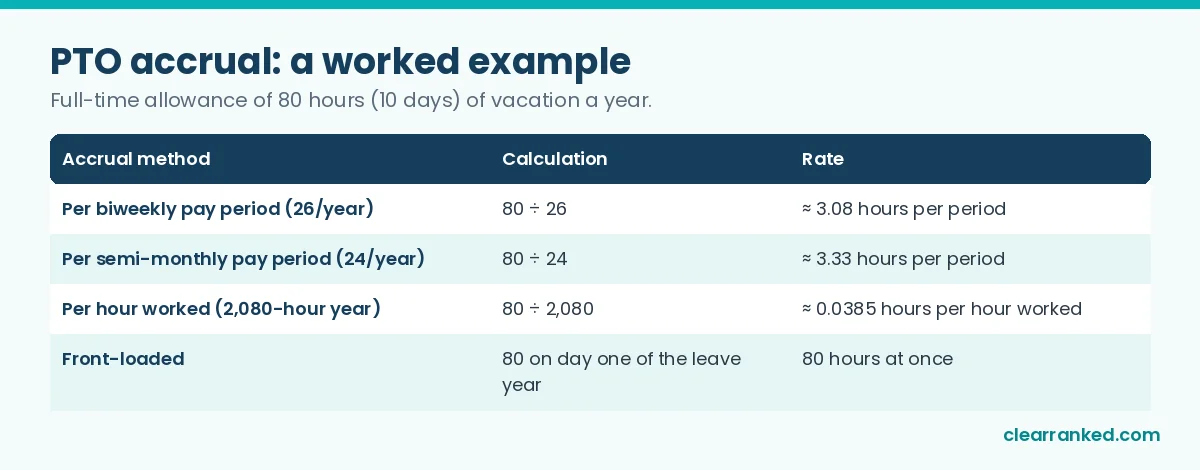
With accrual, people earn time off bit by bit, each pay period or per hour worked. The rate is the yearly allowance divided by your pay periods. Give someone 80 hours a year on a biweekly payroll and they pick up about 3.08 hours per paycheck (80 ÷ 26). Good software does that sum for everyone, every run.
Let’s make it concrete. Say you offer full-time staff 80 hours (10 days) of vacation a year.
| Accrual method | Calculation | Rate |
|---|---|---|
| Per biweekly pay period (26/year) | 80 ÷ 26 | ≈ 3.08 hours per period |
| Per semi-monthly pay period (24/year) | 80 ÷ 24 | ≈ 3.33 hours per period |
| Per hour worked (2,080-hour year) | 80 ÷ 2,080 | ≈ 0.0385 hours per hour worked |
| Front-loaded | 80 on day one of the leave year | 80 hours at once |
Now add a carryover cap of 40 hours, a new hire who starts in July, and a part-timer on 24 hours a week. That’s where spreadsheets usually break. A rounding error in one formula gets copied down the column, and nobody notices until someone disputes a balance. A good tracker handles pro-rating and caps as settings, not formulas.
For the UK, the GOV.UK holiday entitlement calculator is the official way to check part-time and irregular-hours figures. Use it to sanity-check whatever your software produces during setup.
Standalone tracker or the PTO module in your HR/payroll tool?
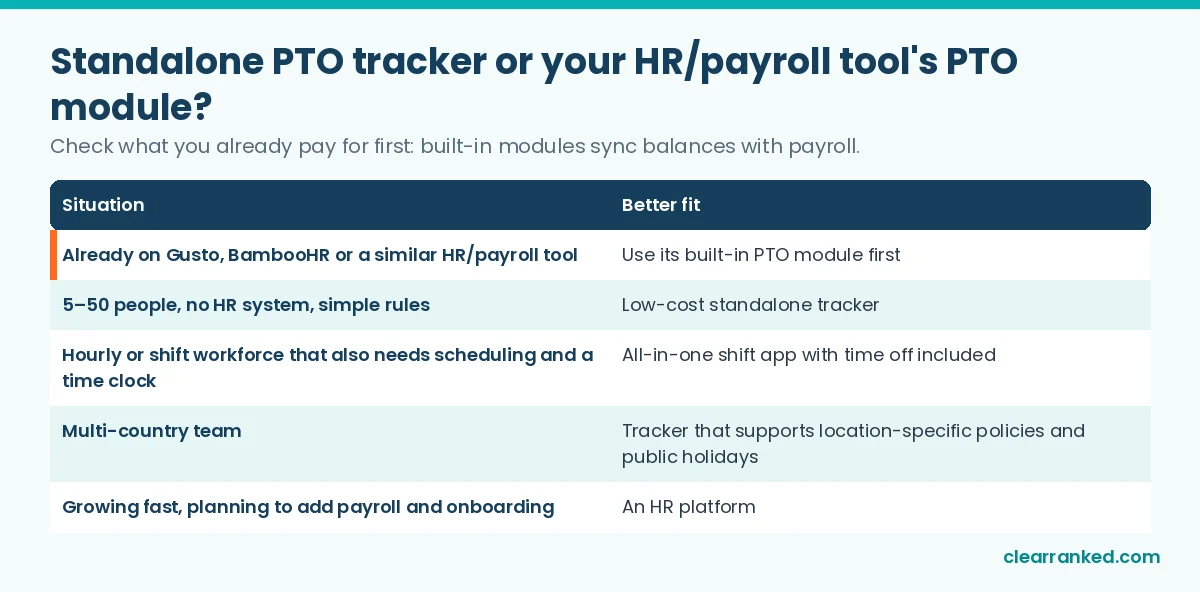
If you already pay for payroll or HR software, check its time-off module first. Gusto, BambooHR and many others include PTO tracking, and because it’s connected to payroll, balances flow into paychecks. A standalone tracker makes sense when you have no HR system, need deeper leave rules, or want approvals inside Slack or Teams.
If you take one thing from this guide, make it this. I keep seeing small firms pay for a separate leave app when the payroll tool they already use has one built in. Here are two cases from the vendors’ own pricing pages, checked October 12, 2026:
- Gusto’s pricing page (accessed Oct 2026) lists “Basic PTO policies and holiday pay” on its Simple plan.
- BambooHR’s pricing page (accessed Oct 2026) lists time-off management, a time-off calendar and unlimited custom policies in its Core plan.
The bundled version wins on one thing that matters a lot: payroll sync. When leave and pay live in different systems, someone has to re-key or reconcile, and that’s where the errors creep in.
When a standalone PTO tracker wins
The standalone tool wins when:
– You don’t have (or want) a full HR suite yet.
– Your leave rules are more complex than your HR tool supports, such as TOIL, multiple locations or seniority-based entitlement.
– Your team ignores anything that isn’t Slack or Teams. Adoption beats features.
| Situation | Better fit |
|---|---|
| Already on Gusto, BambooHR or a similar HR/payroll tool | Use its built-in PTO module first |
| 5–50 people, no HR system, simple rules | Low-cost standalone tracker |
| Hourly or shift workforce that also needs scheduling and a time clock | All-in-one shift app with time off included |
| Multi-country team | Tracker that supports location-specific policies and public holidays |
| Growing fast, planning to add payroll and onboarding | An HR platform (see our cloud-based HR software guide) |
What does PTO software cost in 2026?
Standalone PTO trackers usually charge a few dollars per user per month, and some have free tiers for very small teams. Full HR platforms that include time off cost more because you’re paying for everything else as well. Here’s what official pricing pages showed on October 12, 2026. Always check current pricing before you buy, because vendors change plans often.
| Tool | Type | Published price (checked Oct 12, 2026) | Source |
|---|---|---|---|
| Timetastic | Standalone leave tracker (UK-based) | Business $1.50, Pro $2.50 per user/month; Rota & Time Clock $5.50. Page metadata lists UK prices of £1.20 / £2.00. 30-day free trial | timetastic.co.uk/pricing |
| Vacation Tracker | Standalone, Slack/Teams/Google-based | Core $2 per user/month billed monthly ($50 minimum). Complete $4 per user/month billed monthly ($100 minimum), per its help center | Pricing, help center |
| Connecteam | All-in-one shift/ops app; time off in HR & Skills hub | Free “Small Business Plan” for up to 10 users; paid hubs from $29/month for the first 30 users (annual) | connecteam.com/pricing |
| Gusto | Payroll + HR; PTO included | Simple $49/month + $6 per person | gusto.com/product/pricing |
| BambooHR | HR platform; PTO included | Flat $250/month (Core) for 25 or fewer employees; per-employee pricing above that (see note) | bamboohr.com/pricing |
A few things to watch in the small print:
- Minimums. Vacation Tracker’s monthly minimums mean a 10-person team pays the $50 floor on Core, not $20.
- Who counts as a “user”. Connecteam charges a fixed price for the first 30 users and per-user rates after that, so its cost per head drops as you grow toward 30.
- BambooHR’s two numbers. The page header shows $10 per employee/month for Core, while the FAQ on the same page says pricing “starts at $10.25.” Both apply only to companies with more than 25 employees, so get a quote.
How do you choose PTO tracking software? A 5-step process
Write down your leave policy first. Then list the leave types and rules you need, check whether your existing HR or payroll tool already handles them, shortlist two or three tools, and trial each one with real requests from a few employees. Pick whichever one people actually use without being chased.
- Write your policy before you shop. Leave types, accrual or front-load, carryover, leave year, and who approves. If you can’t write it down, no software will fix it. (SHRM’s guidance on choosing a small-business HRIS (accessed Oct 2026) makes the same point about defining must-have features before comparing vendors.)
- Check what you already pay for. Log into your payroll or HR tool and look for “time off” or “PTO.” You may be done here.
- Shortlist on dealbreakers, not feature counts. For UK employers, that’s correct pro-rating and irregular-hours accrual. For US multi-state employers, it’s flexible policies by location. For shift teams, it’s mobile and scheduling.
- Run a two-week pilot. Use every free trial (Timetastic offers 30 days, Connecteam 14) with three or four real employees and one manager. Submit, approve, cancel and edit requests. Check that balances match what you calculated by hand.
- Check the exit. Can you export leave history to CSV? You’ll need it if you switch later, or if a former employee disputes their final pay.

Common mistakes to avoid
The most common mistakes are buying a tool before the policy is written down, forgetting to import opening balances, not testing pro-rated figures for part-timers and mid-year joiners, and running a separate leave app that never syncs with payroll. Any of these can leave balances wrong from day one.
- Skipping the opening balance import. Start with zero and you’ll spend a month fielding “where did my holiday go?” messages.
- Letting managers approve outside the system. One “sure, take Friday off” in a hallway undoes the whole point.
- Ignoring part-timers in testing. Test the oddest employee you have, not the standard 40-hour one.
- Over-buying. A 12-person firm doesn’t need burnout analytics. It needs accurate balances and a calendar.
Where PTO tracking fits in your wider HR stack
PTO tracking is usually the first HR process a small business automates, because the pain is constant and visible. Once it works, the next questions are about onboarding, payroll and documents. For the bigger picture, read our pillar guide to cloud-based HR software. To set the rules first, see how to write a PTO policy for a small business. If you’re outgrowing your current platform, see our list of BambooHR alternatives. Before anyone leaves, check PTO payout laws by state.
More PTO guides from ClearRanked:
- How to track PTO for a small team, spreadsheet vs software
- A free PTO tracking spreadsheet template for Excel and Google Sheets
- Formulas for PTO accrual calculation, with worked examples
- UK teams: our UK holiday entitlement calculation guide
Who provides automated PTO tracking tied to payroll?
Most full-service payroll providers now build PTO tracking into some of their plans, but rarely into the cheapest one. Gusto includes basic PTO policies on its Simple plan, while QuickBooks Payroll only adds time off management on its Workforce Premium and Elite tiers. So check the plan, not just the brand.
| Provider | Plan with PTO tracking | Published price (Nov 2026) |
|---|---|---|
| Gusto | Simple and up | $49/month + $6 per person |
| QuickBooks Payroll | Workforce Premium | $88/month + $13 per employee |
| QuickBooks Payroll | Workforce Elite | $134/month + $17 per employee |
The QuickBooks figures are list prices from its payroll pricing page, which also runs a 70%-off promo for the first three months. QuickBooks describes the feature as custom time off policies, balance tracking and one-click approvals. Its base Workforce Payroll plan doesn’t list it.
What does “tied to payroll” actually buy you? When an approved vacation day posts, the hours land on the next paycheck as PTO pay and the balance drops on the pay stub. No one re-keys anything. If your provider charges extra for that, compare the upgrade cost with a $2 to $4 per-user standalone tracker plus a payroll export. For the full payroll bill, see our QuickBooks Payroll cost breakdown.
FAQ
Often, yes, if you use accruals, carryover or part-time allowances. Spreadsheets cope with about five people on simple rules. Past ten, one broken formula can throw off everyone’s balance.
For a small team with a written policy, usually a few hours to a day. Most of the time goes on entering opening balances and leave types. Test a part-timer and a mid-year starter before you go live.
Mostly scope. A PTO tracker covers paid time off: requests, approvals and balances. A leave management system also handles things like family, medical and unpaid leave, plus the records you need to keep for each.
In most tools, yes. Self-service requests from a phone or browser are a standard feature. If your team works in Slack or Microsoft Teams, look for a tracker that takes requests and approvals there.
Yes. You still need to know who’s out and when, and some states have rules about paying out PTO when someone leaves. Tracking also shows you who isn’t taking any time off at all.
PTO tracking software is an app that manages paid time off. Employees submit leave requests, managers approve them, and the system updates balances and accruals automatically and shows a shared calendar of absences. Many HR and payroll platforms include it as a module.
Yes. Connecteam’s pricing page lists a free Small Business Plan for up to 10 users, which includes time off. Most paid trackers also offer free trials, such as Timetastic’s 30-day trial. Check current limits, because free tiers change.
You can for a handful of employees on simple rules. Once you have accruals, carryover caps, part-timers or more than one approver, spreadsheets become error-prone and hard to audit. That’s usually the point where dedicated software pays for itself.
Divide the annual allowance by the number of pay periods. For example, 80 hours a year paid biweekly (26 periods) is about 3.08 hours per paycheck. For hourly accrual, divide the annual allowance by expected annual hours. 80 ÷ 2,080 is about 0.0385 hours per hour worked.
Not under federal law. The US Department of Labor says the FLSA doesn’t require pay for time not worked, such as vacations or sick leave. State and local laws can add requirements, so check your state labor department.
Most UK workers are entitled to 5.6 weeks of paid holiday a year, which is 28 days for someone working five days a week, according to GOV.UK. Part-time workers get a pro-rata amount, and employers can include bank holidays in the total.
Many do. Trackers built into payroll platforms such as Gusto sync automatically. Standalone tools often offer integrations or exports. For example, Timetastic lists QuickBooks and Sage 50 integrations on its pricing page. Confirm the specific integration you need before buying.
About the author
Ali Hassan is the owner and editor of ClearRanked, an independent business-software blog. He researches HR, payroll and PTO tools using vendor pricing pages, official government guidance and published data, and every source in this guide was checked in October 2026. I’m Ali Hassan, the founder of ClearRanked. I run small businesses myself, and I know how much time goes into picking the right HR, payroll and project tools. ClearRanked is where I share plain-English guides and honest comparisons, so small business owners can choose software with confidence instead of guesswork.
How we work: this guide is research-based. We don’t take payment for rankings, and we update guides when laws or prices change. Read more on our About page.