Compensation Planning Software: How Small Businesses Plan Raises Without the Spreadsheet Chaos (2026)
Compensation planning software is a tool for deciding who gets paid what, and why. It holds your salary bands and market data, gives managers a raise budget to work within, routes their proposals for approval, and records every decision, so your annual pay review stops living in a fragile spreadsheet that only one person understands.
Without a system, pay reviews in a small company tend to go like this. The owner opens last year’s salary sheet, someone adds a column called “2027 proposed”, three managers send numbers by email, and by the second week of January nobody’s sure which version is final. Then a good employee finds out the new hire in the next seat earns more. That’s the moment when people start searching for software.
This guide is for owners and HR leads at companies with roughly 15 to 200 people. It explains what these tools actually do, the handful of terms you need (bands, compa-ratio, merit matrix), the pay transparency laws that make written pay ranges a legal issue rather than a nice-to-have, and what five options cost. It sits in our HR Software section.
How we researched this: no paid, hands-on testing. Market data comes from the US Bureau of Labor Statistics, legal points from state labor agencies and EUR-Lex, and prices from each vendor’s own pricing page, all checked on October 19, 2026. Finally, any dollar example we built ourselves is labeled as an estimate.
Key takeaways
- Compensation planning software runs your pay review cycle: bands, budgets, manager proposals, approvals and a record of every change.
- Private-industry wages and salaries rose 3.1% in the 12 months to June 2026, according to the BLS Employment Cost Index. That’s a sensible reference point for a raise budget, not a rule.
- Colorado, California, New York and Washington all require pay ranges in job postings (thresholds vary), and EU member states had to adopt the Pay Transparency Directive by 7 June 2026.
- Below about 25 people, a well-built spreadsheet plus free market data is often enough.
- Prices we checked ran from free benchmark data (Pave Market Data Lite) to $650 a month flat for BambooHR Elite at 25 or fewer employees.
What is compensation planning software?
Compensation planning software is HR software that manages how pay changes are proposed, approved and recorded. It stores salary bands and benchmark data, sets a budget for each manager, collects raise and bonus recommendations, checks them against policy, and produces letters or statements once decisions are final.
Most products bundle the same core jobs:
- Pay structure: job levels and salary bands, ideally with a minimum, midpoint and maximum for each.
- Market data: salary benchmarks, built in or imported, so you can see whether a band is still realistic.
- Cycle management: a merit or bonus cycle with a start date, a budget and deadlines.
- Manager worksheets: each manager sees only their team, their budget and the guidelines.
- Approvals and audit trail: who proposed what, who changed it and when.
- Communication: raise letters or total rewards statements that employees actually read.
You’ll also see the terms compensation management software, salary planning software and compensation planning tools. In practice, vendors use the two labels loosely. If anything, “management” leans toward the ongoing structure (bands, benchmarks, pay equity reports) and “planning” toward the yearly review cycle. Most tools do both.
Which compensation terms do you need to know?
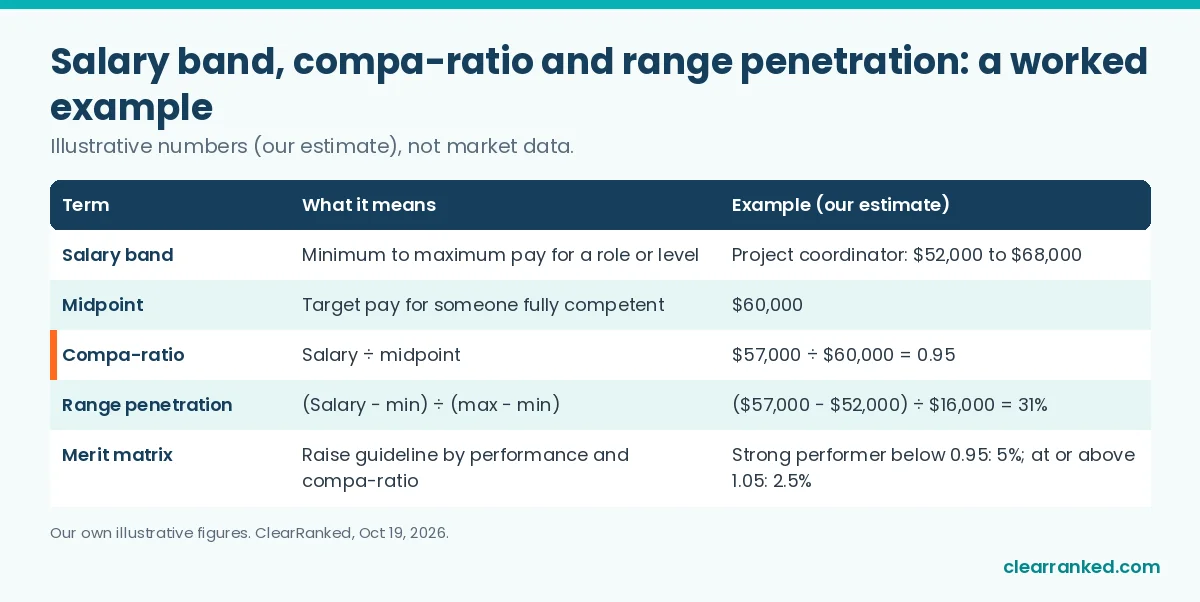
Five terms cover most of it: a salary band is the pay range for a role; the midpoint is the target rate for a fully competent employee; compa-ratio is salary divided by midpoint; range penetration shows where someone sits between minimum and maximum; and a merit matrix links raise size to performance and position in the band.
Here they are with a worked example. These are our own illustrative numbers, not market data.
| Term | What it means | Example (our estimate) |
|---|---|---|
| Salary band | Minimum to maximum pay for a role or level | Project coordinator: $52,000 to $68,000 |
| Midpoint | Target pay for someone fully competent in the role | $60,000 |
| Compa-ratio | Salary ÷ midpoint | $57,000 ÷ $60,000 = 0.95 |
| Range penetration | (Salary − minimum) ÷ (maximum − minimum) | ($57,000 − $52,000) ÷ $16,000 = 31% |
| Merit matrix | Raise guideline by performance and compa-ratio | Strong performer below 0.95: 5%; at or above 1.05: 2.5% |
Why bother with the jargon? Because it changes the conversation. “Maria wants more money” is an argument. “Maria’s a strong performer at a 0.95 compa-ratio, so the matrix says 5%” is a decision you can defend to her, to her peers and, if it ever comes to it, to a state labor agency.
How does a compensation planning cycle work?
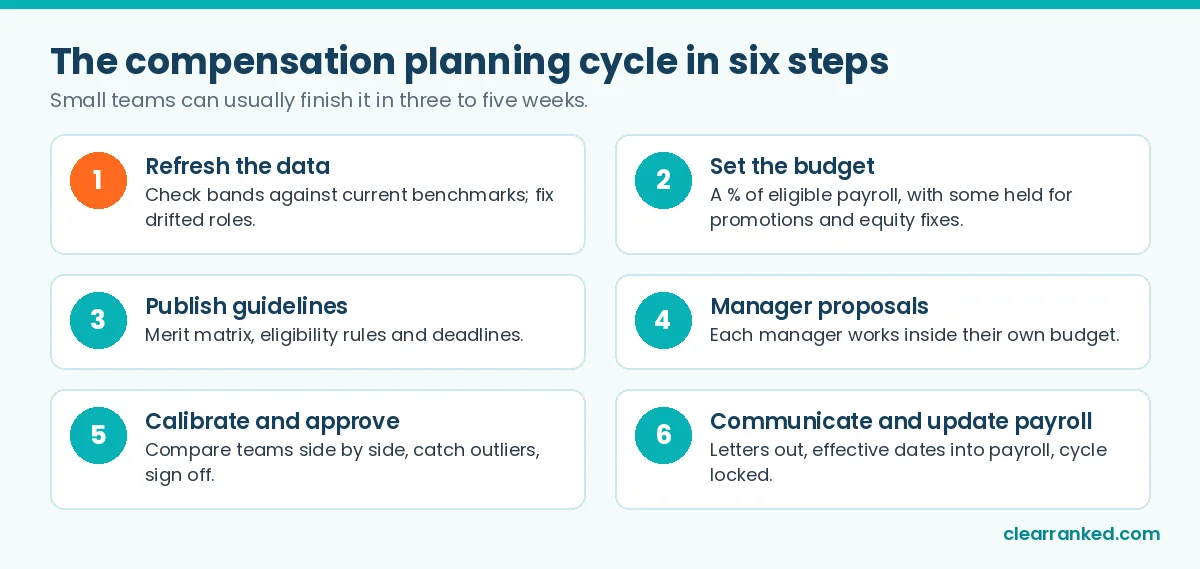
A typical cycle runs six steps: refresh market data and bands, set the overall budget, publish guidelines such as a merit matrix, let managers propose changes, calibrate and approve them, then communicate and push the final numbers to payroll. Small teams can finish it in three to five weeks.
Here’s the order that tends to work, whichever tool you use:
- Refresh the data. Check bands against current benchmarks and fix roles that have drifted.
- Set the budget. Usually a percentage of eligible payroll, with a slice held back for promotions and equity fixes.
- Publish guidelines. A merit matrix, eligibility rules (for example, hired before October 1) and deadlines.
- Manager proposals. Each manager works inside their own budget.
- Calibrate and approve. Leadership compares teams side by side, catches outliers and signs off.
- Communicate and update payroll. Letters go out, effective dates go into payroll, and the cycle is locked.
Step 6, though, is where spreadsheets bite hardest. Someone has to retype 40 new salaries into payroll, and a typo there becomes a paycheck error. For this reason, most dedicated tools either sync to your HRIS or export a file payroll can import. Ask to see that in the demo, too.
Setting a raise budget: what the BLS data says
You don’t need a paid survey to sanity-check your overall budget. The BLS Employment Cost Index for June 2026 (released July 31, 2026, accessed Oct 19, 2026) shows private-industry wages and salaries up 3.1% over 12 months, and total compensation up 3.3%. However, adjusted for inflation, wages actually fell 0.4%. That last number is worth remembering when an employee says their raise “didn’t feel like one.” The next release, covering September, is scheduled for October 30, 2026.
Here’s a quick estimate to show the maths. A 20-person company with $1.3 million in eligible base pay that sets a 3.5% budget has $45,500 to spend. If it holds back 0.5% ($6,500) for promotions and equity fixes, managers share $39,000. Those figures are our illustration, not a recommendation, and plenty of small firms land above or below that.
Do pay transparency laws affect compensation planning?
Yes. Several US states require pay ranges in job postings, and EU countries had to adopt pay transparency rules by June 2026. Once ranges are public, your salary bands become visible, so you need documented bands, consistent decisions and records showing why two people in the same role earn different amounts.
The rules differ by state, so here are the ones we confirmed on official sites:
| Jurisdiction | What it requires | Who it covers |
|---|---|---|
| Colorado | Compensation and benefits in all job postings, internal and external; notice of job opportunities to employees | Employers covered by the Equal Pay for Equal Work Act (CDLE) |
| California | Pay scale in any job posting; pay scale for an employee’s own role on request | 15 or more employees for postings (California Labor Commissioner) |
| New York State | Compensation range in advertised jobs, promotions and transfers | 4 or more employees (NY DOL) |
| Washington | Wage scale or salary range plus a description of benefits in job postings | 15 or more employees (WA L&I) |
| European Union | Member states had to transpose Directive (EU) 2023/970 by 7 June 2026 | Employers in EU member states, under national laws (EUR-Lex) |
All sources accessed Oct 19, 2026. This isn’t a complete list (Illinois, Massachusetts and others have their own laws), and it isn’t legal advice.
What this means in practice: if you post a coordinator job in Denver at “$52,000 to $68,000”, your existing coordinators will see it. If one of them earns $49,000, you’ll hear about it that week. Good compensation planning software won’t fix that for you, but it will show you the problem before the posting goes live, which is the whole point.
When is a spreadsheet enough, and when do you need an automated compensation planning tool?
Rule of thumb: a spreadsheet holds up until about 25 staff, provided one person approves raises, there’s one location and one review a year. Past that, or once you need posted pay ranges, an approval trail or a clean handoff to payroll, the sheet becomes the bottleneck and the risk.
Honestly? For a 12-person shop where the owner signs off every raise, a spreadsheet is fine. A sheet with a tab for bands, a tab for employees and a compa-ratio formula costs nothing, everyone can open it, and you can pair it with Pave’s free benchmark tier for market data.
The cracks show in predictable places:
- More than one manager. You end up emailing copies, and version control falls apart.
- Privacy. In a shared sheet, hiding columns isn’t security. So one curious manager can see everyone’s pay.
- No history. When someone asks why they got 2% two years ago, the answer is gone.
- Posting rules. If you hire in a state with posting laws, you need bands you can defend.
- Payroll handoff. After all, rekeying numbers is where errors creep in.
Two or more of those ringing true? Start shopping. It’s the same pattern we describe in our guide to small business HR solutions: teams rarely outgrow everything at once, just one tool at a time.
How do you build a salary pay scale before you load it into software?
Group your jobs into levels, price each level against market pay data, set a midpoint, then choose a range spread to get each band’s minimum and maximum. Pay band management software stores, checks and updates that structure. It doesn’t decide the numbers for you, so do this part first.
- Level the jobs. Four to six levels are usually plenty for a company under 100 people. More than that and the bands start to overlap into mush.
- Price benchmark jobs. The BLS Occupational Employment and Wage Statistics survey is free and breaks wages down by occupation and metro area. Paid surveys add company size and industry detail.
- Set the midpoint near the market rate for a fully competent person in that level.
- Pick a spread and do the math. Minimum = midpoint / (1 + spread / 2). Maximum = minimum x (1 + spread).
Say a project coordinator’s midpoint is $60,000 and you choose a 30% spread. The minimum is $60,000 / 1.15 = $52,174, and the maximum is $52,174 x 1.30 = $67,826. That’s close to the $52,000 to $68,000 band in the terms table above, and the midpoint lands right in the middle.
Once the bands exist, a spreadsheet or salary planning tool can flag anyone below minimum or above maximum before raise season starts.
How much does compensation planning software cost?
Free at the bottom, a few hundred a month at the top. On October 19, 2026 we found Pave’s Market Data Lite at $0, Lattice’s Compensation add-on at $6 per seat (plus a base product, $4,000 a year minimum) and BambooHR Elite at $650 monthly for teams of 25 or fewer. Others only quote.
| Tool | What it is | Published price (checked Oct 19, 2026) | Compensation features |
|---|---|---|---|
| Spreadsheet | Excel or Google Sheets | Free with software you already have | Whatever you build |
| Pave | Comp data and planning platform | Market Data Lite free; paid plans by demo (price not published) | Benchmarks from 9,000+ companies on the free tier; planning cycles on paid plans |
| Lattice | Performance and HR platform | Compensation add-on +$6 per seat/month on a base product (Performance listed at $10); $4,000 minimum annual agreement | Benchmarks, comp bands, cycle management, statements, multi-step approvals |
| BambooHR | HR suite | Elite: $650/month flat for 25 or fewer employees; $25 per employee/month above 25 | Compensation planning worksheets, Mercer salary benchmarking, levels and bands |
| Figures | Comp benchmarking and review tool | Quote only | Salary bands, compensation reviews, pay transparency reports |
| HiBob | HR suite | Quote only | Compensation module with benchmarking powered by Mercer |
| Payscale | Comp data and software | Quote only | Paycycle for compensation planning, Marketpay for pricing jobs |
Search results for this topic also surface smaller, SMB-focused planners such as Aeqium, SimplyMerit and Compease, and one review notes that ADP acquired Pequity in October 2025. We didn’t verify those vendors’ prices, so they aren’t in the table.
What would a 20-person team pay?
Here is the math for a 20-person team. Using those list prices: a spreadsheet and Pave’s free tier cost nothing; Lattice Performance plus Compensation works out to $320 a month at $16 a seat, but the $4,000 annual minimum lifts it to about $333; BambooHR Elite is $650 a month, though that also covers all your core HR. Of course, these aren’t like-for-like, and we’ve flagged every price that isn’t published.

One more thing on BambooHR: its pricing page shows a per-employee price for Core that differs slightly between the plan card ($10) and the FAQ ($10.25). That doesn’t affect the Elite number above, but check the page on the day you buy. If you’re weighing BambooHR against a payroll-first tool, our BambooHR vs Gusto breakdown covers where each one is stronger.
How do you choose compensation planning software?
Start with the cycle you actually run and the data you already own. If your HR suite has a compensation module, test that first. Need better market data? Then pick a tool that has strong benchmarks. If your pain is the review process itself, prioritize manager worksheets, approvals and a clean payroll handoff.
Our quick picks, by situation:
| Your situation | Look at first |
|---|---|
| Under 25 people, owner decides every raise | Spreadsheet plus Pave Market Data Lite |
| Already on BambooHR and want everything in one place | BambooHR Elite |
| Running performance reviews in Lattice | Lattice Compensation add-on |
| Hiring in pay transparency states or the EU, need reporting | Figures or HiBob (ask for a demo of pay gap reports) |
| You mostly need defensible market pricing for jobs | Payscale or Pave paid tiers |
Prep takes ten minutes. Note your yearly raise count, the number of managers who suggest raises, and the file or system holding pay data. Then grill every vendor with the same list:
- Can managers see only their own team, and nothing else?
- Can I build a merit matrix based on performance and compa-ratio?
- What happens when a manager goes over budget?
- How do final numbers reach payroll: sync, file or retyping?
- Can I export every decision with a date and an approver?
Our take: most companies under 50 people buy too much here. In fact, the expensive part of compensation isn’t the software, it’s a bad decision repeated across a dozen raises. If you’re also looking at best talent management software, check whether one platform can cover performance and pay together, since raise decisions lean so heavily on review scores. And if your HR data is still split across tools, it may be worth moving to one of the cloud-based HR systems first, so salary data has a single home.
How do you roll it out before your next review cycle?
Load clean employee and salary data first, then build bands for your most common roles, run a small test cycle with one or two managers, fix the guidelines, and only then open the full cycle. Plan for four to eight weeks before your review date, not the week before.
- Clean the data. Job titles, hire dates, current pay and managers. Otherwise, messy titles break band matching.
- Build bands for 80% of roles first. Don’t stall on the three unusual ones.
- Set permissions before anyone logs in.
- Pilot with two managers using last year’s numbers.
- Write a one-page guide for managers explaining the matrix and the deadline.
- Run the real cycle, then export and archive the final decisions.
Timing matters more than people expect. If raises take effect January 1, start this in October. That’s also why we published this guide now.
Related guides
- Best Talent Management Software
- Small Business HR Solutions Compared
- HR Automation Software: What to Automate First
- How to Set Up Payroll
- All HR Software guides
FAQ
It runs your pay review process in one place. It stores salary bands and market data, gives each manager a raise or bonus budget, collects their proposals, routes them for approval, keeps a dated record of every decision and sends final numbers to payroll or an export file.
Vendors use both labels loosely. Compensation planning usually means the yearly or twice-yearly review cycle: budgets, proposals and approvals. Compensation management is broader and includes ongoing salary bands, benchmarks and pay equity reporting. Most tools sold under either name cover both jobs.
Not always. Below about 25 employees, with one person approving all raises, a structured spreadsheet and free benchmark data usually work. Software earns its cost when several managers propose raises, when pay ranges must appear in job postings, or when payroll errors creep in from retyping numbers.
There’s no required figure. As a reference point, the BLS Employment Cost Index showed private-industry wages and salaries up 3.1% in the 12 months to June 2026. Many companies set an overall percentage of eligible payroll near that level, then hold back a small slice for promotions and equity fixes.
On October 19, 2026, Pave offered free benchmark data, Lattice listed its Compensation add-on at $6 per seat a month on top of a base product with a $4,000 yearly minimum, and BambooHR Elite was $650 a month flat for 25 or fewer employees. Figures, HiBob and Payscale quote prices individually.
About the author
I’m Ali Hassan, the founder of ClearRanked. I run small businesses myself, and I know how much time goes into picking the right HR, payroll and project tools. ClearRanked is where I share plain-English guides and honest comparisons, so small business owners can choose software with confidence instead of guesswork.
How we work: this guide is research-based, and every source in it was checked in October 2026. We don’t take payment for rankings, and we update guides when laws or prices change. Read more on our About page.