Employee Self Service (ESS): What It Is, What It Costs and How to Set It Up
Employee self service (ESS) is software that lets employees handle their own HR and payroll tasks online, without asking you. In a typical ESS portal, employees view pay stubs and W-2s, update direct deposit and tax withholding, request time off and sign new-hire forms. For a small business, ESS usually comes built into payroll or HR software.
Here’s the problem it solves. You own a 12-person cleaning company. In one week, three people text you for old pay stubs (one’s renting an apartment, two are applying for car loans), someone changes banks, and two want the same Friday off. None of it is hard. All of it eats your evening.
ESS hands those jobs back to the people who need them done. This guide explains what an ESS portal does, what it costs from real vendor pricing pages, the legal detail most owners miss on electronic W-2s, and how to roll it out without a revolt.
How we researched this: we read current pricing and feature pages from BambooHR, Square Payroll, Homebase, Zoho People and Paycom. For the W-2 rules we used the IRS regulation on electronic W-2 statements and the IRS Form W-2 instructions. Everything was checked in October 2026. We haven’t run these products ourselves, so treat the vendor details as a starting point for your own trial.
Key takeaways
- ESS lets employees do routine HR tasks on their own: pay stubs, W-2s, direct deposit, W-4 changes, time off and onboarding paperwork.
- Most small businesses get ESS as part of payroll or HR software rather than buying it separately.
- Square Payroll lists $35 a month plus $6 per person paid, with digital pay stubs and an employee app included.
- BambooHR charges a flat $250 a month for its Core plan if you have 25 or fewer employees.
- You can only send W-2s electronically to employees who have agreed to it. For 2026 wages, W-2s are due to employees by February 1, 2027.

What is employee self service?
Employee self service is the part of an HR or payroll system that employees log into themselves. Instead of asking a manager for a document or a change, they open a website or phone app, find what they need, and do it. Changes flow straight into payroll and HR records, with the owner approving only what needs approval.
Think of it like online banking for work. Your bank doesn’t make you call to see a statement. ESS does the same for pay and HR records.
You’ll also hear it called an ESS portal, an employee portal or an employee app. They’re the same idea. The difference is usually whether it lives in a browser, on a phone, or both.
On the other side sits manager self-service. That’s where you or a supervisor approve time-off requests, sign off on timesheets and see team schedules. Most tools bundle the two.
What can employees do in an ESS portal?
In most ESS portals, employees can see and download pay stubs and tax forms, update their address, bank account and W-4 withholding, request time off and check their balance, enroll in benefits, and complete onboarding forms. Some also handle clock-ins, shift swaps and expense receipts.
The features you’ll actually use depend on your business. Here’s how they map to common setups:
| Feature | Matters most for | Where you’ll usually find it |
|---|---|---|
| Pay stubs and W-2s online | Every business with employees | Payroll software |
| Direct deposit and W-4 updates | Teams with turnover or new hires | Payroll software |
| Time-off requests and balances | Teams with a PTO policy | HR or PTO software |
| Clock in and out, shift swaps | Restaurants, retail, crews | Scheduling and time apps |
| Benefits enrollment | Teams offering health plans | HR or payroll with benefits |
| Onboarding forms and e-signatures | Anyone hiring a few people a year | HR software |
Some vendors push further. Paycom’s Beti, for example, has employees review and fix their own payroll errors, like a missing punch, before payroll runs. Zoho People builds its ESS around a portal it calls Spaces, where staff see personal, team and company information in one place.
Honestly, a 5-person shop doesn’t need half of this. Pay stubs, W-2s, direct deposit and time off cover most of the requests you’ll get.
How much does employee self-service software cost?
For a small business, ESS usually costs nothing extra because it comes with payroll or HR software you’re already paying for. Square Payroll lists $35 a month plus $6 per person paid. BambooHR’s Core HR plan is a flat $250 a month for 25 or fewer employees. Homebase has a free plan for one location with up to 10 employees.
Here’s what a 10-person team would pay at list prices in October 2026:
| Product | Type | Monthly price (10 people) | Math |
|---|---|---|---|
| Homebase Basic | Scheduling and time tracking | $0 | Free for 1 location, up to 10 employees |
| Square Payroll | Full-service payroll | $95 | $35 + ($6 x 10) |
| BambooHR Core | HR platform | $250 | Flat rate, 25 or fewer employees |
| BambooHR Pro | HR platform | $425 | Flat rate, 25 or fewer employees |
A few notes on those numbers. Square’s pricing page lists digital pay stubs, self-onboarding and its Team App for employees on the full-service plan. Above 25 employees, BambooHR switches to per-employee pricing that starts at $10.25 a month for Core. And Homebase’s paid tiers run $30, $70 and $120 per location per month, with the free tier limited to basic scheduling and time tracking.
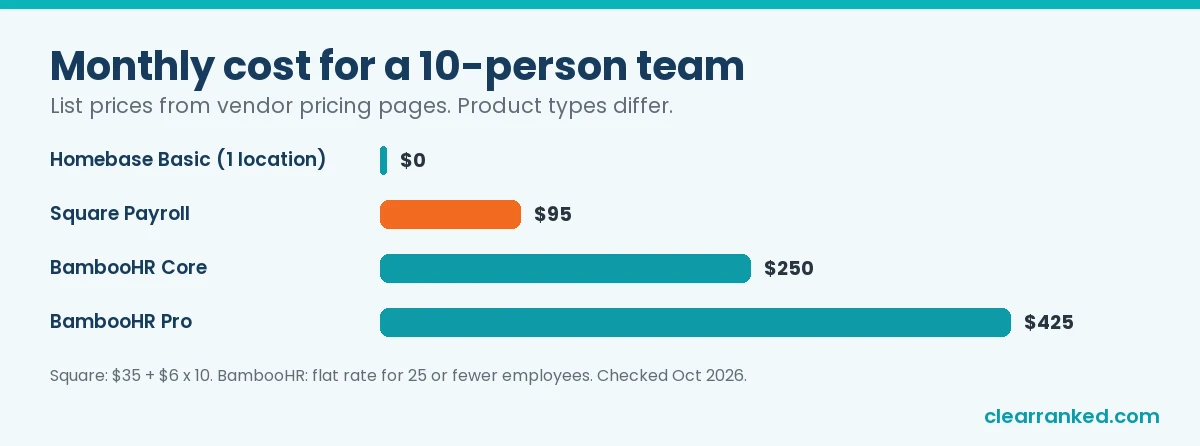
These aren’t apples-to-apples. Square is payroll first, BambooHR is HR first, and Homebase is scheduling first. So compare on the tasks your team asks you about most. Our BambooHR vs Gusto comparison shows how an HR-first and a payroll-first tool differ in practice.
Can you give employees their W-2 online?
Yes, but only with consent. Under IRS rules, an employee has to agree to receive a W-2 electronically, in a way that shows they can open it in the format you’ll use. Anyone who doesn’t agree still gets paper. Either way, 2026 W-2s are due to employees by February 1, 2027.
This comes from 26 CFR 31.6051-1(j). The regulation also lets employees withdraw consent later. In practice, a good ESS tool asks for consent during onboarding with a checkbox and keeps a record of it.
Don’t skip this step. If your software turns on paperless W-2s by default and nobody consented, you haven’t actually furnished the form. That’s a penalty risk, and a headache in late January when someone says they never got it.
The deadline is in the IRS W-2 instructions. It’s February 1, 2027 for 2026 wages, because January 31 falls on a Sunday.
What are the benefits of employee self service for a small business?
The big benefit is time. Each pay stub request, address change or time-off text is small, but together they can eat hours a month. ESS also cuts typing errors, because employees enter their own details once, and it gives employees answers at 11 p.m. on a Sunday without calling you.
Here’s a rough way to size it. Say a 15-person restaurant gets 20 routine HR requests a month and each takes 10 minutes to handle. That’s 20 x 10 = 200 minutes, or about 3 hours 20 minutes a month. Over a year, that’s 40 hours. At $40 an hour of your time, that’s $1,600 a year in owner time.
Other benefits are harder to put a number on, but you’ll feel them:
- Fewer data entry errors. A bank account typed by its owner is less likely to be wrong than one copied off a paper form.
- Faster onboarding. New hires can fill in tax and deposit forms before their first shift.
- Clear PTO records. Requests, approvals and balances live in one place. See how to track PTO if you’re still on a spreadsheet.
- Less awkwardness. Some employees would rather not ask the boss for a pay stub to show a landlord.
The downside? Some employees won’t log in, at least at first. And if you pick a tool with a clunky phone app, you’ll end up doing the tasks yourself anyway.
How do you roll out an ESS portal?
Start with the two or three features your team asks about most, usually pay stubs and time off. Turn those on, invite everyone with a short how-to, get W-2 consent during sign-up, and stop handling those requests by text after a set date. Add more features once people are logging in.
- Pick the tool. If you already run payroll, check what ESS it includes before buying anything new.
- Clean up your records first. Wrong emails or phone numbers will block invitations.
- Send invitations with a one-page guide. Screenshots beat long instructions.
- Collect electronic W-2 consent during setup, and keep paper as the default for anyone who declines.
- Pick a cutover date, maybe the first payday of next month. After that, point every request to the portal.
- Review access. Managers should see their own team, not everyone’s pay.
Security matters here, since the portal holds Social Security numbers and bank details. So look for two-factor login, and remove access the day someone leaves. Our guides to cloud-based HR software and HR automation software cover what else to check.
If the tool also handles leave, our PTO tracking software guide explains which accrual features are worth paying for.
How much does a mobile ESS app cost?
For employees, nothing. Mobile self-service apps from payroll providers are free downloads, and they only work once the employer pays for the payroll or HR system behind them.
For example, ADP Mobile Solutions is listed as free on the App Store, and it opens pay, time and benefits information only for people whose employer uses ADP. Square works the same way: its payroll pricing page lists the Square Team App as included with full-service payroll at $35 a month plus $6 per person paid. A 5-person team on Square pays $65 a month in total ($35 + 5 x $6), and the app costs nothing extra.
So when you budget for mobile ESS, price the payroll or HR plan, not the app. Before you buy, check that the mobile app covers what your staff will actually use, such as pay stubs, time-off requests and clocking in, since some features live only in the web portal.
Related guides
- Cloud-based HR software
- HR solutions for small businesses
- HR automation software
- BambooHR vs Gusto
- What is PTO tracking software?
- How to set up payroll
FAQ
ESS stands for employee self service. It’s the part of HR or payroll software that employees log into themselves to view pay stubs, update personal details, request time off and complete forms.
Often it is, as part of software you already pay for. Payroll and HR tools usually include an employee portal at no extra charge. Standalone HR platforms such as BambooHR charge for the whole system, starting at a flat $250 a month for Core with 25 or fewer employees.
Yes. IRS rules require each employee to agree to receive the W-2 electronically. Employees who don’t agree must get a paper copy, and they can withdraw consent later.
ESS is what employees use to handle their own records and requests. MSS, or manager self service, is what managers use to approve time off, review timesheets and see team information. Most tools include both.
Yes. Even a 3-person business can use one if its payroll software includes it. The time saved is smaller, but online pay stubs and time-off requests still cut down on texts and paperwork.
In most payroll portals, yes. Employees can submit an updated Form W-4 online, and the change applies to future paychecks once processed.
About the author
I’m Ali Hassan, the founder of ClearRanked. Also, I run small businesses myself, and I know how much time goes into HR paperwork and payroll admin. ClearRanked is where I share plain-English guides and honest comparisons, so small business owners can make decisions with confidence instead of guesswork.
How we work: this guide is research-based, and every source in it was checked in October 2026. We don’t take payment for rankings, and we update guides when laws or prices change. Finally, read more on our About page.