Employee Scheduling Software for Small Business: 2026 Prices
Employee scheduling software is a program that builds shift schedules, sends them to staff phones, and handles swaps, time-off requests and often time clocks. For a small business, good options cost $0 to about $100 a month. Homebase and Sling start free, and Connecteam is free for up to 10 users.
If you still build the schedule in a spreadsheet and text it to everyone, you already know the pain. Someone screenshots last week’s version. Two people swap without telling you. A shift goes uncovered on Saturday night.
A scheduling program fixes most of that for less than the cost of one hour of manager time a week. This guide compares current prices from five vendors, shows the real monthly cost for a 15-person team, and explains which pricing model fits which kind of business.
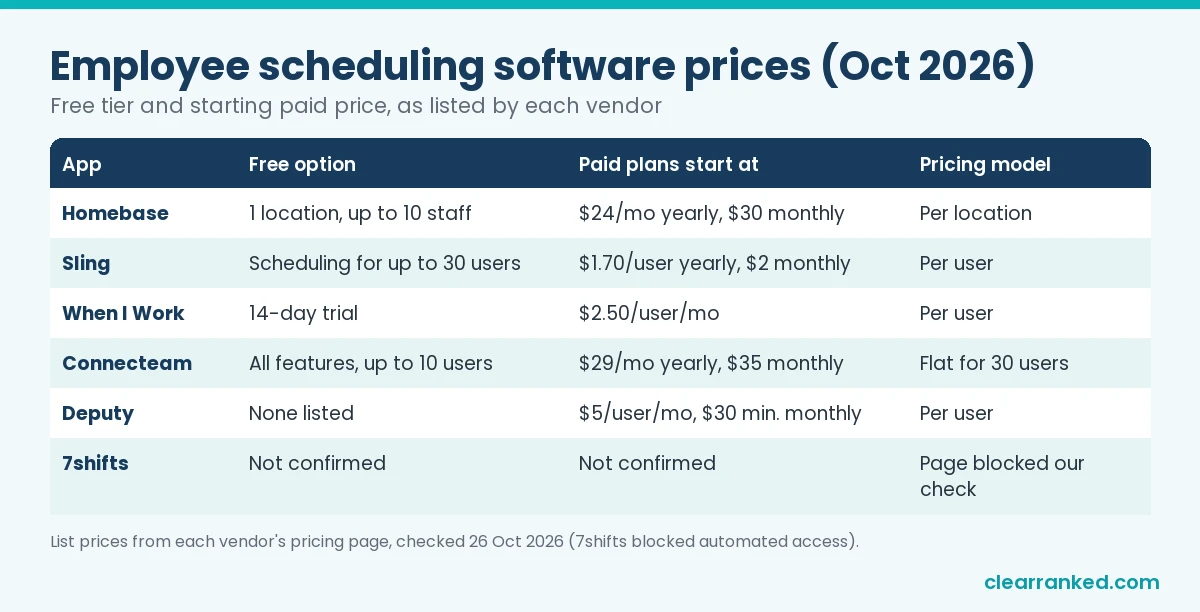
How we researched this: we pulled list prices on 26 October 2026 from Homebase, When I Work, Sling, Deputy and Connecteam. The 7shifts pricing page blocked our automated check, so we haven’t quoted its prices. We didn’t test the apps hands-on.
Key takeaways
- Free options exist: Homebase Basic (1 location, up to 10 employees), Sling (scheduling for up to 30 users) and Connecteam’s Small Business Plan (up to 10 users).
- Per-location pricing (Homebase) is usually cheapest for single-site teams with lots of part-timers.
- Per-user pricing ranges from $1.70 (Sling Premium, yearly) to $9 (Deputy Pro) per user a month.
- Deputy charges a $30 minimum monthly spend on its monthly plans.
- Annual billing saves money: about 15% on Sling, 18% on Connecteam and 10% on Deputy, per their pages.
What is employee scheduling software?
It’s an app that replaces the paper or spreadsheet schedule. Managers drag shifts onto a calendar, publish them, and employees see their hours on their phones. Most tools also handle shift swaps, open shifts, availability, time-off requests and team messaging, and many add a time clock that feeds payroll.
Think about a 15-person coffee shop open seven days a week. The owner needs two openers, three mid-day staff and two closers every day, and half the team are students whose availability changes each semester. A scheduling program stores that availability and warns you before you book someone who can’t work.
Time clocks are the second big win. When punches flow straight into timesheets, you stop retyping hours, and overtime shows up before payday instead of after it. Federal law requires overtime for non-exempt staff past 40 hours in a workweek, per the DOL overtime page, so catching it early is real money.
How much does employee scheduling software cost?
Expect $0 to about $100 a month for a small team. Free plans cover basic scheduling for small headcounts. Paid plans run roughly $2 to $9 per user a month on per-user pricing, $24 to $120 per location on Homebase, or a flat $29 to $119 a month for up to 30 users on Connecteam.
| App and plan | Monthly billing | Yearly billing (per month) |
|---|---|---|
| Homebase Essentials | $30 per location | $24 per location |
| Homebase Plus | $70 per location | $56 per location |
| Homebase All-in-One | $120 per location | $96 per location |
| Sling Premium | $2.00 per user | $1.70 per user |
| Sling Business | $4.00 per user | $3.40 per user |
| When I Work Essentials / Pro / Premium | $2.50 / $5 / $8 per user | Not separately listed |
| Deputy Lite / Core / Pro | $5 / $6.50 / $9 per user (as listed) | About 10% less |
| Connecteam Operations Basic | $35 for first 30 users | $29 for first 30 users |
A few notes. When I Work’s FAQ says single-location teams start at $2.50 per user and multi-location businesses at $5, and its time tracking add-on is a separate toggle, so confirm the final price on the page. Connecteam adds a per-user charge after the first 30 people ($0.8 a month each on yearly Basic, $1.0 monthly).
Which scheduling app is cheapest for a small business?
For one location, Homebase and Sling are the cheapest paid options at about $30 a month for 15 employees on monthly billing. Connecteam’s flat $35 plan is close behind and stays flat up to 30 users. Per-user tools like Deputy cost more as you add part-timers.

The math: Sling Premium is $2.00 x 15 = $30. When I Work Essentials is $2.50 x 15 = $37.50. Deputy Core is $6.50 x 15 = $97.50. Homebase Essentials stays at $30 whether you have 8 people or 40, because it charges per location.
Now flip the scenario. A 4-person landscaping crew on Sling Premium pays $2 x 4 = $8 a month, far less than Homebase’s $30 per location. But Deputy would bump up to its $30 monthly minimum, even though 4 x $5 = $20. So per-user pricing wins for tiny teams, while per-location or flat pricing wins as headcount grows.
| Team | Cheapest fit | Why |
|---|---|---|
| 1 location, under 10 staff | Homebase Basic or Connecteam free | $0 for core scheduling |
| 1 location, 10 to 30 staff | Homebase Essentials or Connecteam Basic | Flat price, unlimited or 30 users |
| Several locations | Per-user tools (Sling, When I Work) | Per-location fees multiply |
| Need advanced labor rules | Deputy | More compliance and budget tools |
What features should a scheduling program have?
Look for a mobile app employees actually like, drag-and-drop scheduling, availability and time-off requests, shift swaps with manager approval, open-shift posting, overtime alerts, a time clock with GPS or kiosk options, and a payroll integration. Templates for repeating weeks save the most time.
- Schedule templates: copy last week in one click, then tweak.
- Overtime warnings: flag anyone heading past 40 hours before you publish.
- Time clock: GPS for field crews, a shared tablet kiosk for a shop floor.
- Payroll export: check it connects to what you already use, such as QuickBooks payroll.
- Team messaging: so shift notes don’t live in personal text threads.
- Time-off requests: tied to balances if you track PTO. See how to track PTO.
Do you need AI scheduling? Homebase lists an AI scheduling assistant on its Plus plan. It can help with big rosters, but most owners of 10 to 20 people get more from good templates than from automation.
Which scheduling software fits your type of business?
Restaurants and retail shops with lots of part-timers usually do best on per-location or flat pricing like Homebase or Connecteam. Field service and construction crews need GPS time clocks and job tracking. Multi-site businesses and teams with complex labor rules often justify a per-user tool like Deputy or When I Work.
Our picks, with reasons:
- Single cafe, salon or shop: Homebase. One flat location price and a solid free tier.
- Tiny team on a budget: Sling. Scheduling is free for up to 30 users, and paid tiers stay cheap.
- Field crews and job sites: Connecteam. Its Operations hub bundles a GPS time clock and job scheduling. Contractors should also read our construction scheduling software guide.
- Multi-location or shift-heavy operations: Deputy or When I Work, where per-user pricing scales cleanly across sites.
Whichever you choose, run a two-week trial with your real schedule. If managers save time and staff stop texting you about shifts, it’s worth it.
How do you switch from spreadsheets to a scheduling app?
Pick one app, load employee contact details and availability, build one template week, and run the old spreadsheet in parallel for two weeks. Then turn the spreadsheet off, set rules for swaps and time-off requests, and connect the time clock to payroll once you trust the hours.
- Collect each employee’s phone, email and availability.
- Create roles (cashier, cook, crew lead) so shifts match skills.
- Build a template week and publish it.
- Ask everyone to install the app and confirm they can see their shifts.
- Run both systems for two pay periods, then retire the spreadsheet.
- Compare clocked hours to your hours worked calculator for the first payroll.
Keep your records, too. Federal rules require keeping time cards and work schedules for at least 2 years, so make sure your app lets you export history. Labor rules vary by state, so check local predictive scheduling or break laws if they apply to you.
Related guides
- Scheduling apps for construction crews
- Total weekly hours fast
- How overtime pay works
- Employee self service portals
- Leave management systems
- QuickBooks payroll pricing
FAQ
For small teams, Homebase Basic (1 location, up to 10 employees), Sling (free scheduling for up to 30 users) and Connecteam’s free plan (up to 10 users) are the strongest free options we found.
When we checked in October 2026, Essentials was $30 per location a month billed monthly or $24 billed yearly. Plus was $70 or $56, and All-in-One was $120 or $96.
It offers a 14-day free trial. Paid plans were listed at $2.50, $5 and $8 per user a month.
Yes. Deputy lists a $30 minimum monthly spend on its monthly Lite, Core and Pro plans.
Often yes, if you schedule shifts weekly. Free plans from Homebase, Sling or Connecteam cover a team that size at no cost.
Most can. Many include a time clock and export or sync hours to payroll, which helps you catch overtime past 40 hours a week.
About the author
I’m Ali Hassan, the founder of ClearRanked. Also, I run small businesses myself, and I know how much time goes into shift scheduling, payroll and staff management. ClearRanked is where I share plain-English guides and honest comparisons, so small business owners can make decisions with confidence instead of guesswork.
How we work: this guide is research-based, and every source in it was checked in October 2026. We don’t take payment for rankings, and we update guides when laws or prices change. Finally, read more on our About page.