I-9 Employment Eligibility Verification PDF: Form I-9 for 2026 and How to Fill It Out
You can download the official I-9 employment eligibility verification PDF free at uscis.gov/i-9. The current edition is dated 01/20/25. New hires complete Section 1 by their first day of paid work, and employers must complete Section 2 within 3 business days of the start date. Keep each form 3 years after hire or 1 year after the person leaves, whichever is later.
Form I-9 is one of the few hiring forms every US employer must use for every employee, citizens included. It’s short, but the deadlines are strict, and paperwork mistakes alone can cost up to $2,861 per form.
This guide covers which edition to use, how to fill out each section, the document lists, how long to keep forms, E-Verify and the penalties. It’s written for small employers doing this without an HR department. Not legal advice; complex cases may need an immigration attorney.
How we researched this: we used the USCIS Form I-9 page, the Handbook for Employers (M-274) sections on Section 1 and Section 2, the penalty table in 28 CFR 85.5, and the E-Verify overview. All were checked in October 2026.
Key takeaways
- Use the 01/20/25 edition. The 08/01/23 edition with a 05/31/2027 expiration is also still valid.
- Section 1 is due by the employee’s first day of work for pay. Section 2 is due within 3 business days.
- Employees choose which acceptable documents to show: one from List A, or one from List B plus one from List C.
- Keep each form for 3 years after hire or 1 year after employment ends, whichever is later.
- Never send I-9s to USCIS or ICE. They stay in your files for inspection.
- Paperwork violations run $288 to $2,861 per form under the current penalty table.
Where can you get the I-9 employment eligibility verification PDF?
Download it free from uscis.gov/i-9. The page offers the fillable form, the instructions, and a Spanish version with its own special use instructions. Check the edition date at the bottom of each page. In October 2026, the current edition was 01/20/25, and the 08/01/23 edition marked to expire 05/31/2027 was also still acceptable.
There’s a wrinkle worth knowing. According to USCIS, there were two versions carrying the 08/01/23 edition date. One expired 07/31/2026 and is no longer valid. The other runs to 05/31/2027. So look at the expiration date printed at the top of the page, not only the edition date at the bottom.
If you use an electronic I-9 system through your payroll or HR software, USCIS said those systems had to be updated by 07/31/2026. Log in and confirm the form version your software generates.
| Edition | Expiration date | Can you use it in late 2026? |
|---|---|---|
| 01/20/25 | Printed at top of form | Yes, current edition |
| 08/01/23 | 05/31/2027 | Yes, until it expires |
| 08/01/23 | 07/31/2026 | No, expired |
| Anything older | Already expired | No |
How do you fill out Form I-9?
The employee fills out Section 1 with their name, address, date of birth, citizenship or immigration status, and signs it by their first day of paid work. Within 3 business days, the employer examines the employee’s original documents, records them in Section 2, and signs. A preparer or translator can help with Section 1 if needed.
- Give the new hire the form and the Lists of Acceptable Documents after you make the job offer.
- Have them complete and sign Section 1 by the end of their first paid day. Review it for blanks.
- Examine their original, unexpired documents in person, or remotely if you qualify under the alternative procedure.
- Record document title, issuing authority, number and expiration date in Section 2.
- Enter the first day of employment, sign, and date Section 2 within 3 business days.
- File the form, with any copies you choose to keep, in your I-9 records.
The Section 1 timing comes from M-274 section 3.0. Social Security number is optional in Section 1 for most employers, but required if you use E-Verify. Don’t tell employees what to write about their status; that’s their attestation.
What is the Section 2 deadline for Form I-9?
Employers must complete Section 2 within 3 business days of the employee’s first day of work. So if someone starts on a Monday, Section 2 must be done by Thursday. If the job will last fewer than 3 business days, Section 2 must be completed no later than the first day of employment.
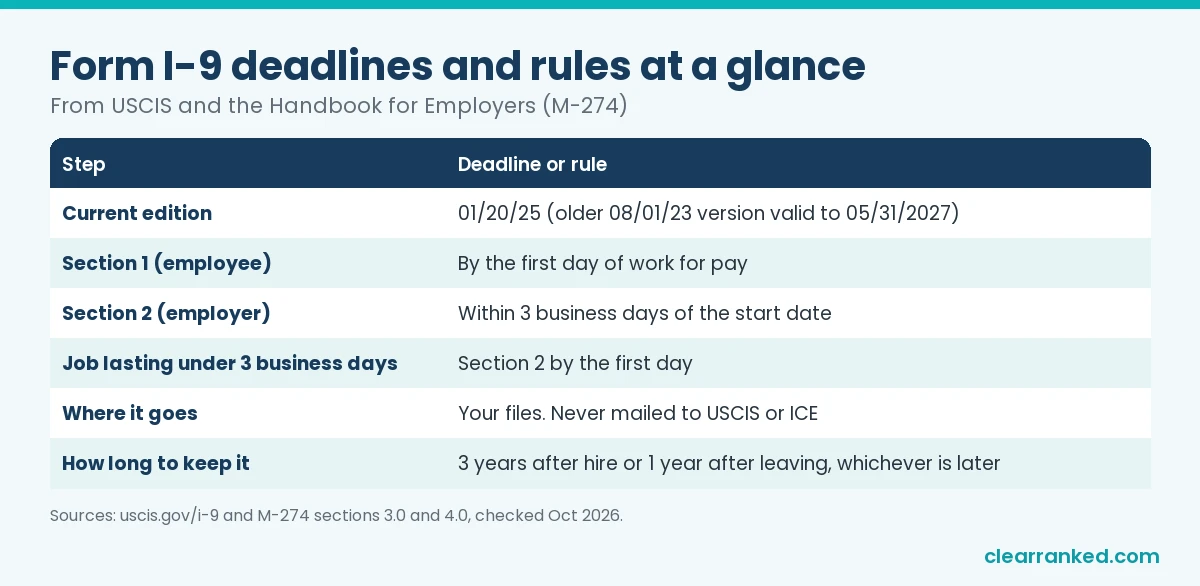
Both examples come from M-274 section 4.0. The day count is business days, so a Friday start pushes the deadline into the next week. Friday plus 3 business days lands on Wednesday.
Remote document review is possible in one case. Employers enrolled in E-Verify and in good standing may examine documents remotely under a DHS-approved alternative procedure, and must check the box in Section 2 saying they did so. Everyone else has to look at the original documents in the employee’s physical presence.
Which documents are acceptable for Form I-9?
The employee chooses what to present. They can show one document from List A, which proves both identity and work authorization, such as a US passport or permanent resident card. Or they can show one List B document for identity, like a driver’s license, plus one List C document for work authorization, like an unrestricted Social Security card.
You can’t ask for specific documents or more documents than the rules require. Doing so can be discrimination, even if you mean well. Just hand over the official lists on page 2 of the form and let the employee choose.
| List | Proves | Common examples |
|---|---|---|
| List A | Identity and work authorization | US passport, permanent resident card |
| List B | Identity only | Driver’s license, state ID card |
| List C | Work authorization only | Unrestricted Social Security card, US birth certificate |
Documents must be original and unexpired, and they must reasonably appear genuine and relate to the person. If something looks off, follow the M-274 guidance rather than guessing. An acceptable receipt can work temporarily in some situations.
How long do you keep I-9 forms?
Keep each I-9 for 3 years after the date of hire, or 1 year after employment ends, whichever is later. For current employees, keep the form the whole time they work for you. Store forms so you can produce them if officials from DHS, the Department of Labor or the Department of Justice ask for them.
Here’s the math with two examples. First, someone hired on March 1, 2024 who leaves on June 30, 2025. Three years after hire is March 1, 2027. One year after leaving is June 30, 2026. The later date wins, so keep the form until March 1, 2027.
Second, a long-time employee hired in January 2015 who leaves on October 15, 2026. Three years after hire passed long ago, in January 2018. One year after leaving is October 15, 2027, so that’s your date.
Keep I-9s apart from personnel files if you can. It limits what an inspector sees and protects private information. Pay records follow a different clock, covered in our guide on getting W-2s from previous employers.
Do you have to use E-Verify with Form I-9?
For most private employers, E-Verify is optional under federal law, though some employers must use it because of state rules or federal contracts. E-Verify is a free online system that checks the information from a completed Form I-9 against government records. You still have to complete Form I-9 either way; E-Verify adds to it, not replaces it.
The E-Verify site describes it as a free service that returns results within seconds in most cases. A practical upside for small employers is the remote document option described above, which is only open to E-Verify users in good standing.
If you sign up, use it consistently for all new hires at a site, not just some. Picking and choosing whom to run can look like discrimination.
What are the penalties for Form I-9 mistakes?
Under the current penalty table, paperwork violations cost $288 to $2,861 per form. Knowingly hiring or continuing to employ unauthorized workers costs $716 to $5,724 per person for a first order, rising to $8,586 to $28,619 per person for later orders. Fines apply per individual, so errors across many forms add up fast.
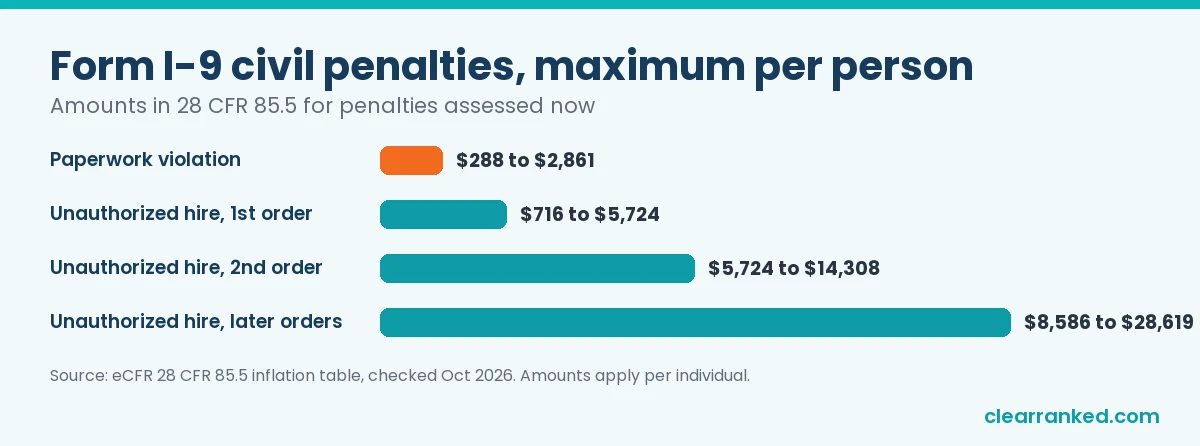
Those amounts are listed in 28 CFR 85.5. The paperwork number is the one most small businesses should worry about. A missing signature, a blank date or a late Section 2 on 10 forms could, in theory, mean 10 separate penalties.
An annual self-audit is cheap insurance. Pull every active I-9, check edition, signatures, dates and document entries, and correct errors using the steps in the USCIS Handbook for Employers (M-274). Never backdate a form. For questions beyond routine fixes, see our employment law attorney guide. For the rest of the hiring stack, our guides to pre-employment physicals and employee handbooks fill in the gaps.
Related guides
- Pre-employment physical rules
- Employment verification letter templates
- W-4 vs W-2 explained
- How to set up payroll
- Employee handbook guide
- Child labor laws and jobs at 14
FAQ
From uscis.gov/i-9, free. Check the edition date at the bottom and the expiration date at the top of each page.
The 01/20/25 edition. The 08/01/23 edition marked to expire 05/31/2027 is also still valid, but the 08/01/23 version that expired 07/31/2026 is not.
Within 3 business days of the employee’s first day of work, so by Thursday for a Monday start. For jobs under 3 business days, by the first day.
No. Keep it in your own files and make it available if DHS, the Department of Labor or the Department of Justice asks to inspect it.
3 years after the date of hire or 1 year after employment ends, whichever is later.
Not for most private employers under federal law, though state rules or federal contracts require it for some. You still complete Form I-9 either way.
About the author
I’m Ali Hassan, the founder of ClearRanked. Also, I run small businesses myself, and I know how much time goes into hiring paperwork, payroll and HR rules. ClearRanked is where I share plain-English guides and honest comparisons, so small business owners can make decisions with confidence instead of guesswork.
How we work: this guide is research-based, and every source in it was checked in October 2026. We don’t take payment for rankings, and we update guides when laws or prices change. Finally, read more on our About page.